When it comes to website best practices, I firmly believe that the size of your site should determine your deployment setup. Not everyone needs the same approach. I rarely try to replicate processes used in enterprise ecosystems for smaller clients because we are dealing with websites that have different teams behind them, different capacities, rules, and goals.
However, enterprises are usually the gold standard when it comes to best practices, and there are things that are often overlooked, or simply unknown, on smaller websites that they can absolutely benefit from.
One of those things is the staging environment.
Website environments in general are one of those areas that can become a bit blurry in terms of ownership and responsibility. A developer or webmaster may handle it, and some SEO professionals can as well, but regardless of who implements it, as a website owner, you should want it.
If you run an ecommerce site, it goes from nice-to-have to non-negotiable.
What’s a Staging Environment?
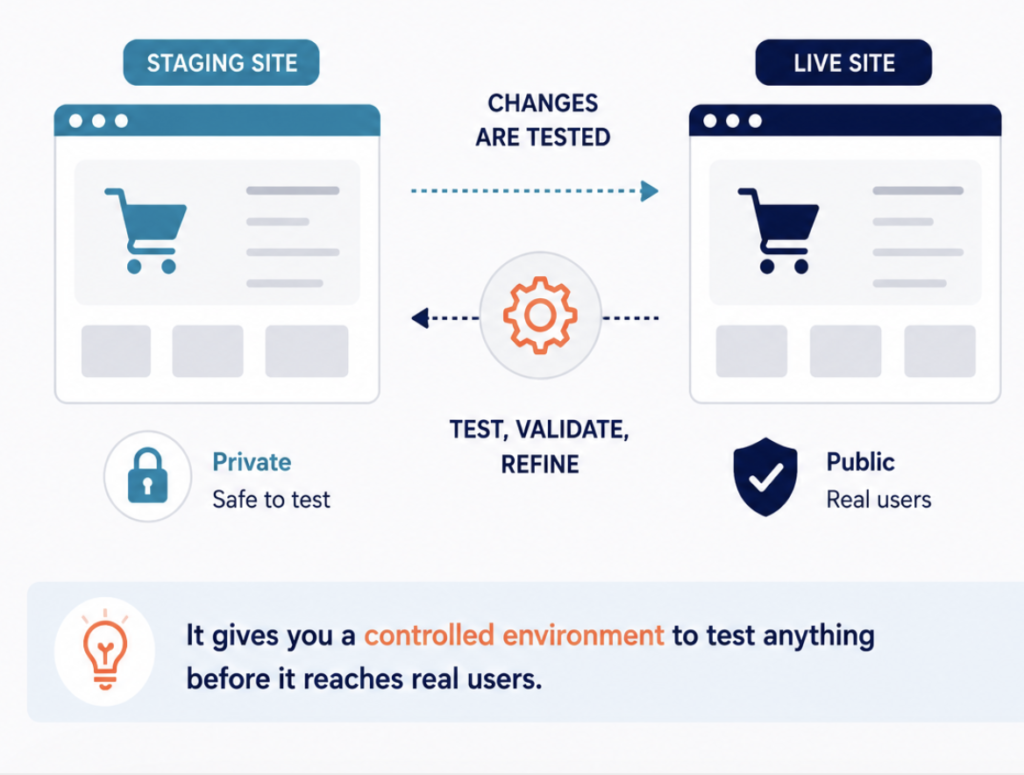
A staging environment is a safe copy of your site used to test changes before they go live. That’s it.
Usually, it’s a separate but identical version of your website hosted on a different URL, such as staging.yoursite.com. It behaves almost exactly like the live site, which allows you to:
- Click through everything
- Test checkout flows
- Mimic user journeys
- Test integrations
- Experiment with design changes
- Validate functionality without impacting UX
Basically, it gives you a controlled environment to test anything before it reaches real users.
Why Staging Matters More in Ecommerce
Ecommerce sites are some of the most delicate websites to manage. First, they are directly tied to revenue, which means that a mistake that might cause a small traffic decline on a corporate site can translate into immediate revenue loss for an online store.
On top of that, unless you run a concept store with very few products and no seasonality, ecommerce sites are constantly changing. Offers, promotions, banners, out-of-stock products, price updates, new collections, new product launches. Things move all the time.
To make matters even more complex, it is very common for multiple people to be working on the site simultaneously. The owner may be updating inventory, the webmaster handling backups and plugin updates, and the SEO consultant, if there is one, creating landing pages, updating metadata and schema, testing server capacity ahead of high-traffic sales periods, or implementing more advanced changes like site architecture updates or hreflang setups.
All of this makes ecommerce websites more vulnerable than most, which is even more reason to make sure things are done properly.
If you’re running an ecommerce business and, like many business owners, handling a lot of things yourself, a staging environment gives you the confidence to rely more on bulk updates, such as stock or pricing changes, instead of doing everything manually. You know you’ll be able to review and test everything before it goes live.
I still come across a considerable number of ecommerce owners, and sometimes even professionals, who continue doing certain time-consuming tasks manually “just to avoid errors.”
If you work on the SEO side, whether you can set this up yourself or not, this is something you absolutely want your clients to have. It saves time for both sides, but more importantly, it allows changes to be tested in a controlled environment while enabling better collaboration. You can show clients updates before deployment instead of making changes directly on the live site.
Think of staging as risk management for visibility and revenue.
How Staging Works Across Platforms
The implementation depends on your hosting provider and CMS, but in most cases it requires little technical knowledge upfront. A developer, webmaster, or sometimes even an SEO professional can usually handle it. That said, staging support varies more than most owners realize, and it’s worth knowing where your platform stands before you assume it’s covered.
On WordPress, staging is usually built into managed hosting and available in a few clicks, which makes it the lowest-friction option for most sites.
Shopify has no native staging environment in the traditional sense. You work around it by duplicating your theme to test front-end changes, but that only covers presentation, not app, checkout, or backend logic, so it’s a partial solution rather than a true staging copy.
BigCommerce sits somewhere in between. It doesn’t offer a full one-click staging clone the way managed WordPress hosts do, so teams typically rely on a combination of sandbox stores, the staging capabilities of a headless or composable setup, or a separate development store to validate changes before pushing them live. For a growing store, this is often the point where staging stops being a hosting feature and becomes an architectural decision, one worth planning for deliberately rather than discovering you don’t have when you need it.
This is also where hosting matters. On newer or fast-scaling stores, whether staging is available, and how cleanly it mirrors production, often comes down to the hosting or platform tier you’re on. It’s a question worth asking early, because retrofitting a safe staging workflow onto a live, revenue-generating store is far more painful than building it in from the start.
One thing to keep in mind: the term “staging” isn’t standardized across platforms, so you may come across different names for the same concept.
Staging vs Backups
Although you will sometimes hear that having a backup is enough, backups and staging environments are complementary, not interchangeable. Yes, you really do need both.
Backups are your safety net. If something breaks, you can restore the site. Unfortunately, when it comes to SEO and UX, you may be able to restore the website itself, but you cannot instantly recover lost traffic, rankings, or user trust.
A staging environment, on the other hand, is your testing ground. It allows you to validate changes and make sure nothing breaks before anything goes live.
Relying only on backups is like deploying code directly to production and saying, “We’ll fix it later if it crashes.” That approach is risky, especially in SEO, where the damage is not always immediately reversible.
Properly Securing a Staging Environment
Not having a staging site is a risk. But having one that is not properly configured comes with risks too. The biggest one is having the staging site crawled and eventually indexed by search engines, which can lead to unwanted cannibalization issues.
To avoid this, you want to make sure the staging site cannot be indexed. And please, do not rely solely on robots.txt for that.
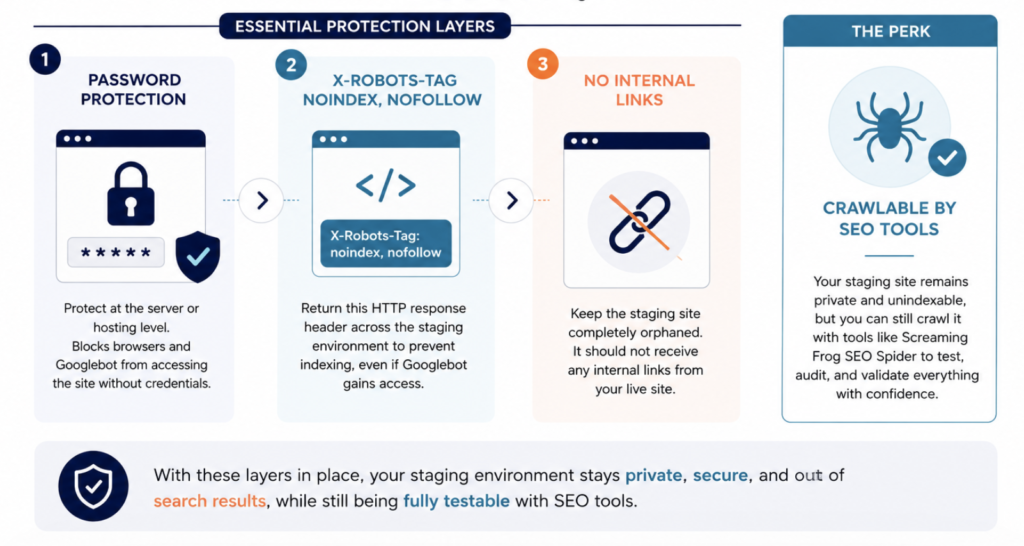
The safest setup includes two layers:
-
Password protection.
This should be configured at the server or hosting level, not through the CMS. This is what actually blocks browsers and Googlebot from accessing the site without credentials.
-
Noindex directives.
Even if Googlebot somehow gains access, you still want to prevent indexing. The safest approach is to return this HTTP response header across the staging environment:
X-Robots-Tag: noindex, nofollow
With both layers in place, the site will not be indexed even if someone links to it, which ideally should not happen anyway. Your staging environment should remain completely orphaned, meaning it should not receive internal or external links.
All of this is a relatively light technical implementation that a webmaster can usually handle without much trouble.
And the best part? A staging environment configured this way can still be crawled with SEO tools like Screaming Frog SEO Spider, which is incredibly valuable for SEO testing and audits.
- Crawling Staging Websites with Screaming Frog tutorial here.
Final Thoughts
A staging environment may feel unnecessary when everything is running smoothly. But ecommerce websites are dynamic by nature, and changes are inevitable. Products change, prices change, integrations change, and sometimes entire site structures change. Having a safe environment to validate those updates before they impact users, rankings, or revenue is simply part of operating a reliable ecommerce store.
The problem with staging is that its value usually becomes obvious only after something goes wrong.
You don’t need a staging site… until the day something breaks on your live store. Then you’ll really wish you had one.
Need a staging environment set up?
If your site doesn’t have one, I set up secure, correctly configured staging environments as a standalone service: password protection, noindex headers, and a fully orphaned setup that stays out of the index. Get in touch for pricing.